
Compare the account selections visible in the uploaded Pro, VIP and Fast player screens, with links to the exact setup guide.
Three distinct account families
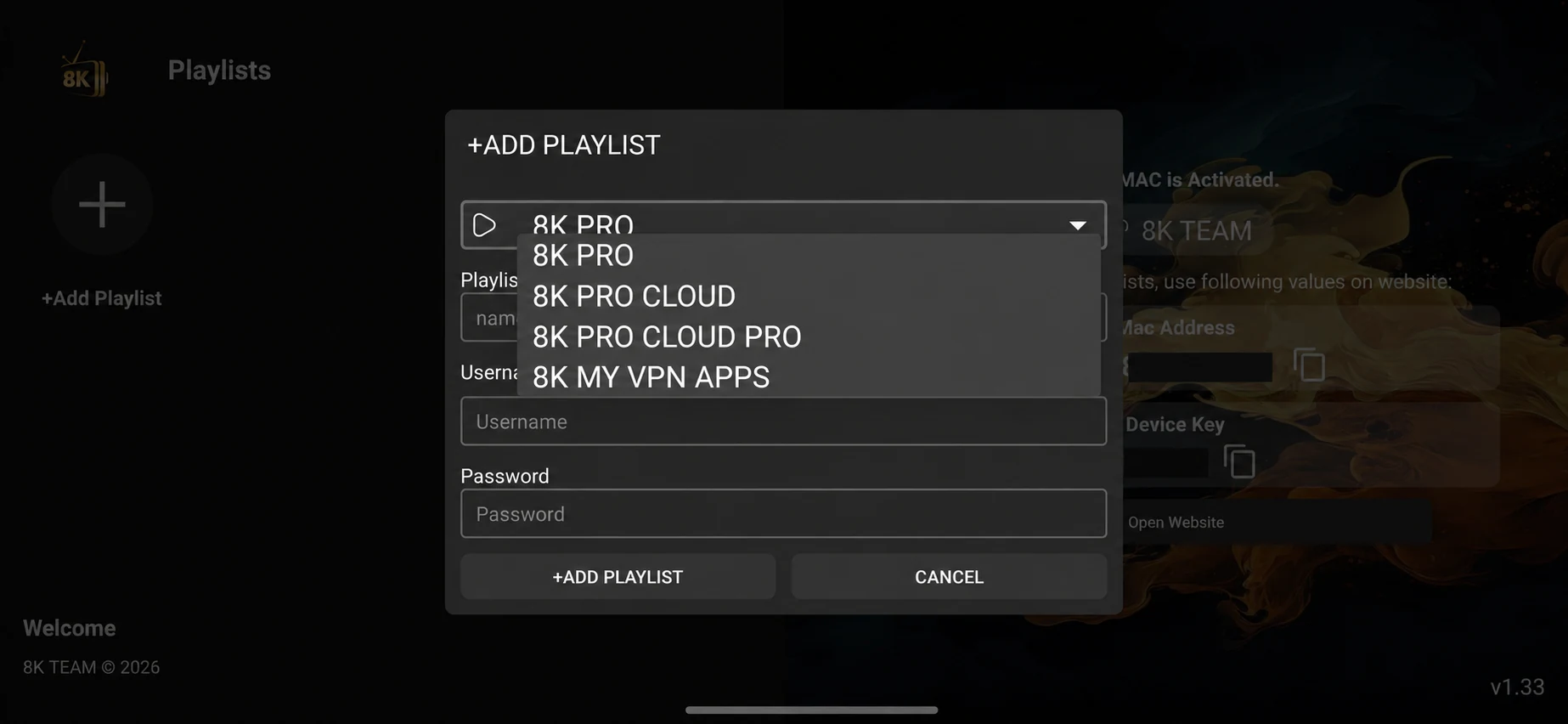
The uploaded VIP+ and Prime forms expose the Pro family. Fast 8K Player has its own Fast server dropdown. VIP uses a tile interface for its VIP family. Start with the installed application, then match the full option to the issued account.
Cloud, KSA and VPN-labelled options are menu choices. No additional quality, privacy or location entitlement should be inferred from their names. Open the exact guide for the observed label and ask support to confirm the matching route.
8K Pro account selection
8K PRO
Choose 8K PRO from the VIP+ Add Playlist dropdown. Its position above the Cloud variants does not assign your account to it automatically.
Read the guideCloud account selection
8K Pro Cloud
Choose 8K PRO CLOUD only when support has issued that account route. A working 8K PRO login is not proof that it will work under Cloud.
Read the guideCloud Pro account selection
8K Pro Cloud Pro
The screenshot lists 8K PRO CLOUD PRO separately from 8K PRO CLOUD. Preserve the full name when reporting a login problem; do not remove the second Pro label.
Read the guideVPN-labelled account route
8K My VPN Apps
8K MY VPN APPS appears as a server choice in the supplied player. The label alone does not establish a standalone VPN application, encrypted tunnel or geographic access guarantee.
Read the guideFast account selection
Fast 8K Server
Select FAST 8K in the server control on the supplied Fast 8K Player activation screen, then use the matching issued username and password.
Read the guideCloud server selection
Fast 8K Cloud
FAST 8K CLOUD is a separate Fast-player server choice. Record this selection with the account login instead of changing servers at random during a playback test.
Read the guideKSA-labelled server selection
Fast 8K KSA
The supplied menu shows FAST 8K KSA. The name does not establish physical server location, Saudi-only eligibility or a different language catalogue; confirm those details directly.
Read the guideCloud Pro server selection
Fast 8K Cloud Pro
Use FAST 8K CLOUD PRO when it is the account route supplied by support. Cloud Pro is not a documented promise of higher resolution, extra connections or a larger catalogue.
Read the guideFast VPN-labelled selection
Fast My VPN Apps
The exact menu wording is FAST 8K MY VPN APPS. It is a visible account choice inside Fast 8K Player; no separate VPN installer, tunnel protocol or privacy specification was supplied.
Read the guideVIP playlist selection
8K VIP
Use the 8K VIP playlist tile for the matching issued VIP account. The Connected status shown in the example reflects the screenshot, not the status of your own login.
Read the guideVIP Cloud playlist selection
8K VIP Cloud
Choose the 8K VIP CLOUD tile only for the account route support names. Confirm the installed VIP version because VIP and VIP+ expose different account-selection interfaces.
Read the guideVIP KSA playlist selection
8K VIP KSA
The VIP interface contains an 8K VIP KSA tile. Ask about eligibility and account routing; the label alone does not verify a specific server country or content entitlement.
Read the guideVIP Cloud Pro playlist selection
8K VIP Cloud Pro
8K VIP CLOUD PRO is distinct from 8K VIP CLOUD in the supplied tile view. Keep the full tile name with the support record so that a different route is not tested by mistake.
Read the guideVIP VPN-labelled playlist selection
8K VIP My VPN Apps
The menu shows 8K VIP MY VPN APPS inside the VIP player. Treat it as an operator-confirmed account choice; no separate VPN download or privacy guarantee was provided.
Read the guide