
The answer for this player
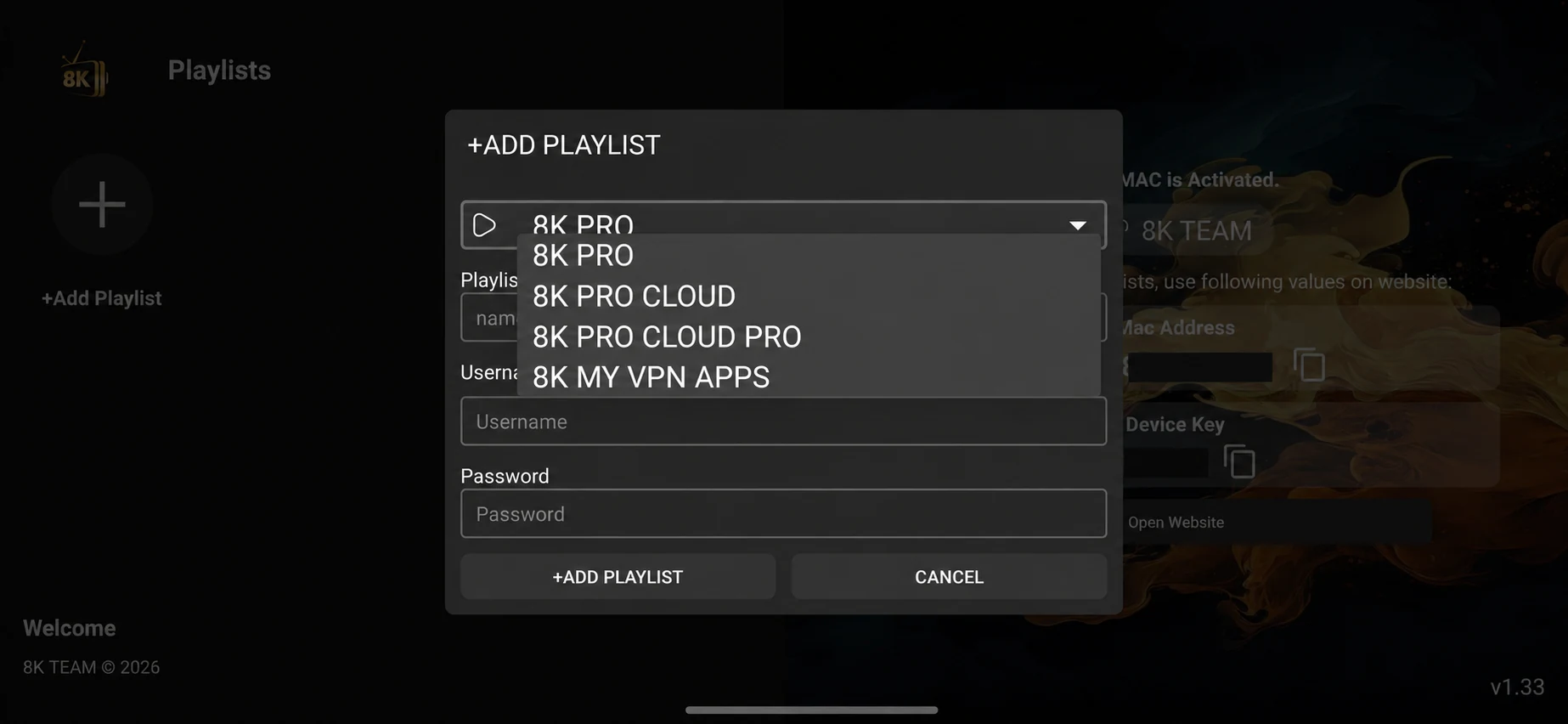
The supplied server selector shows 8K PRO, Cloud, Cloud Pro and My VPN Apps. The label is part of the account connection route. Choosing a different entry can change which service endpoint receives your username and password. A menu label is therefore worth recording beside the player version when you request support.
Check the platform before installing
Identify the operating system, not only the television brand. Android TV, Google TV and a supported Android box can have an Android package route. Samsung Tizen and LG webOS use native applications or a separate connected device. Windows uses its own desktop installer entry. An APK or Downloader code should not be presented as a universal installer for every screen.
Confirm the source and app name
Use the download entry for the named app and review the destination before continuing. If a source is missing or uses an old address, ask support for its current route. Keep the normal operating-system download checks enabled. If a working player is already installed, record the version and the way you will restore its settings before replacing it.
Ask for the account after installation
Once the app is installed, WhatsApp us for a one-day free trial. Include the device model, exact player name and server option visible on the login screen. This gives support the information needed to supply the matching account format. Installing the player is separate from activating the service account.
Keep the fields in their own format
A username-and-password screen needs the issued username and password in separate fields. A screen that asks for a server address needs the address supplied with that account. An M3U playlist link goes into its URL field; a portal activation may involve a device MAC. Do not guess a server endpoint or convert one activation format into another. Copy the issued values carefully and check for extra spaces.
Save the playlist and confirm a real connection
Save the entry and select it to connect. A playlist tile proves that the app stored an entry, not that its account is activated. Open a live category and try a source. If the login fails, check the app, server route, copied fields and activation status before changing picture settings or deleting the whole application.
Make the one-day trial useful
Test at the time you normally watch. Try one live source, one on-demand item and the audio output you will use. Check guide data and a subtitle track where they are available. When the account permits one simultaneous connection, stop the first screen before testing a second device. Record whether an issue affects one item, one category or the entire login.
Troubleshoot the smallest observable problem
A sign-in failure calls for an account-format check. A single channel failing while others play calls for the channel name and failure time. Playback that changes when household downloads start calls for a network comparison. Change one condition at a time and keep the source and account consistent long enough to read the result. Random changes can make the original cause harder to identify.
Keep a short support record
Send the device, operating system, player version, account route and exact symptom. Add the approximate time and what you tested. Conceal passwords, full private playlist URLs and customer identifiers in screenshots. Support can work with the screen layout and error message without publishing complete credentials.
Choose the term after the test
The worldwide plan totals remain 9.59 USD for one month, 23.99 USD for three months, 39.99 USD for six months and 54.99 USD for twelve months. These are full-period prices rather than monthly instalments. Confirm availability, connection allowance and order terms before arranging payment. A longer duration should follow a test of the device and sources you need.